Your camera does many things extremely well. It meters the scene and selects the correct exposure. The newest generation of cameras can select and focus on a face in the scene. It can sense when the light is too low and a flash is needed to compensate. In all this guessing it does it is remarkable how often the camera “gets it right”. One of the things the camera doesn’t do well consistently is choose white balance.
Different sources of light have different color tints, even different times of the day have different color casts. For example, a standard light bulb (Mr. Edison’s kind) casts a yellow tint, a florescent tube casts a blueish-green tint, a flash (pop up on your camera or separate unit) has a closer to white hue. In order to get the colors on you photograph correct you have to tell the camera which light it is looking at. It has to correct or balance the color of the light. Armed with this selection the camera is much better at making a good guess how to select and display true colors.
Fortunately it isn’t hard to select the correct white balance. You will probably have to go to your camera instruction manual to find it the first time. Go to the index and look up “white balance”. It may be obvious (a button on the camera that is labeled “WB”) or it may be hidden in a menu. When you find where it is all you have to do is move it from “A” for automatic to the specific lighting you are going to be under while taking pictures. If you are outside look up. Do you see the sun or are you under a cloudy sky? Are you in the shade? The same is true inside a building. Do you see a regular bulb or something else like a CF (compact florescent) or LED? If you are in an office building the odds are you will select florescent (the company is saving and being green because they both take less electricity and don’t put out much heat.) Your camera probably has icons to represent the type of lighting/white balance selection. A light bulb means tungsten, clouds for a cloudy sky, and etcetera.
I realize you may think I’m pulling your leg here. So don’t trust me go do a little experiment. Take your camera and the owner’s manual and select an area to take a picture. It could be a person or a flower if you wish. Take a picture on “A” auto white balance, a second on the correct type of light, and a third that is purposely the wrong light. Download all three photos to your computer and take a look. Surprised?
See you next month. Keep taking photos!
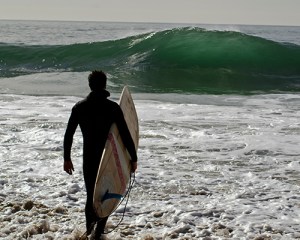
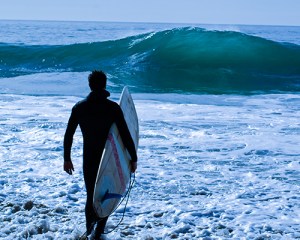
The attached images are in Santa Cruz. The first photo has a daylight white balance, the second is set to tungsten. The first image is the correct color.

 Talkin' about the past, photographing the present