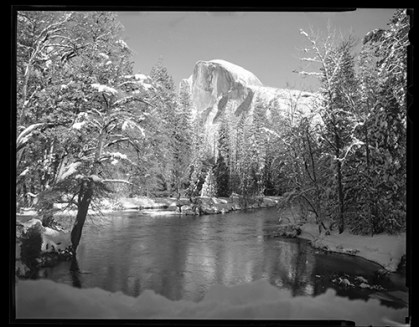
 I recently had the opportunity to photograph Half Dome in black and white (Ilford HP4) and Color (Kodak Porta 160). I did both because I wanted to answer the question, How does a color image transfer to black and white compared to a black and white photo?”
The is not only a question of the artistic nature of the work but also a very practical question when it comes time to load gear for a trip, especially if an airplane is involved. Moreover, the camera manufactures know the desire for black and white remains strong in the marketplace.
My digital Olympus OMD e-M10 has a B&W mode that mimics traditional filter options of red, blue, yellow, and orange. My Nikon D7100, doesn’t emulate in the camera, I simply change the color palate to black and white and use traditional film filters in front of the lens to make the creative choices afforded to film photographers. I’ll do a post in the future about the advantages of colored filters in black and white photography but if you’re curious now I recommend you do a web search. The processor in the camera blends the three channels to mimic a grey tone image but in fact a digital camera allows you to choose color or black and white on the fly because it only uses color pixels. What’s more any color photo can be turned into black and white after the shoot in most photo software. This means you can wait to do the conversion later with the addition any of the black and white photo editors on the market in post processing. With both options on the table we return to my question, is native black and white film better?
Images from Yosemite beg to be printed in black and white. Due, no doubt, in large part to Ansel Adams classic images. Certain times of the year are more amenable to black and white than others. From the valley floor in the winter nearly everything is black and white anyway, white snow, granite cliffs, and bare or monotone trees make color almost insignificant. I set up my 4×5 camera on Sentinel Bridge for these pictures, made a composition I liked, and put in a frame of Porta 160 and then Ilford HP4. I chose the two films because of their unique characteristics, Porta for its natural color and HP4 for its contrast. Back at home I developed and scanned into Photoshop for the post processing.
Doing post processi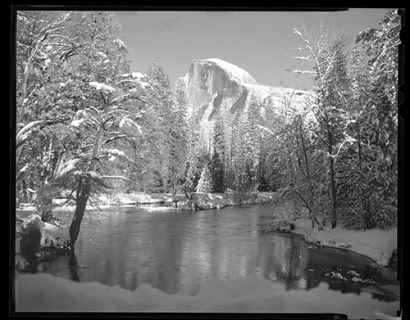 ng of color film into B&W means I get to use Photoshop’s color sliders to bring out parts of the black and white image. Unlike when shooting with B&W film, I can see the changes in real time on the computer screen as I make my edits. With B&W film you must have the filters with you in the field. For example, the use of a red filter to darken skies and accentuate clouds. With color film using the blue filter while in B&W mode achieves the same effect. On the one hand the freedom to make artistic and compositional changes with B&W happens in the field causing me to slow down and be more purposeful. By choosing to previsualize the end product, as suggested by Ansel Adams, my field session is much more focused and more deliberate. With color film I just shoot and make the artistic decisions from the comfort of my desk with a cup of coffee.
Here are the results. Can you tell which is which?
 Talkin' about the past, photographing the present